
Style
7 min read
Revive Your Old iPod And Make It Part Of Your Daily Routine Again
February 20 , 2026
By Chloe Palos
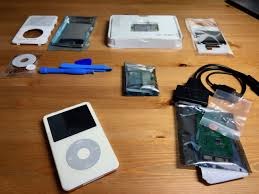
You probably have an old music device tucked in a drawer somewhere, holding songs that shaped pieces of your life.
You probably have an old music device tucked in a drawer somewhere, holding songs that shaped pieces of your life. Maybe it is an apple mp3 player you once carried everywhere, or maybe it is a small ipod nano that still turns on but has not been synced in years. Those devices were built for long hours of audio, simple controls, and distraction-free listening, and you might feel a pull to bring them back into your routine. The problem usually shows up the moment you try to add something new. Your computer refuses to communicate with older hardware, old software feels clunky, and formats no longer match what devices expect.
This is where a simple workflow can change everything for you. You can breathe life into gear you already own by pairing it with a modern transfer tool. Softorino builds tools designed for this exact gap, giving you a way to refresh your old favorites and keep using them with current files. If you enjoy the idea of turning that forgotten device into a small daily companion again, you can do it without stress and without replacing anything. You only need a few steps and a little motivation to start.
Why your old device still deserves space in your life?
You may have shifted to streaming years ago, but local music still has its own rhythm. Older devices offer something your phone cannot: focus. No notifications, no social feeds, no endless temptation to check one more thing. You hold a single-purpose device that plays what you store on it, nothing extra. If you travel, work out, or want a break from your phone, an older music device becomes a perfect fit again.
Many readers are surprised when they charge an old ipod mini or an early apple ipod and see it still works flawlessly. The hardware was built to last. What usually fails is the connection between past tools and current systems. Once you remove that friction, the device immediately regains its usefulness.
Why syncing became harder for you over time?
You might notice that older music tools were tightly attached to older syncing software. Systems changed, computers updated, and support faded away. Even if your ipod touch still functions, connecting it to a modern computer might feel like trying to fit two puzzle pieces from different boxes.
File formats also evolved. High-quality video clips from your phone will not always drop into older hardware. When you try to transfer video from iphone to pc, you might see incompatible formats or missing codecs. The same thing happens when you attempt to load those files into an older device. You feel stuck even though the device itself is still fine.
Where a modern tool makes your life easier?
Instead of fighting against outdated syncing systems, you can use a direct-transfer method that handles formats for you. Softorino offers software created for readers in your exact situation. Their tools convert and move files in one step: you drag, you drop, and the device receives what it can read. This removes the entire struggle of conversion settings, outdated apps, or manual fixes.
If you have an apple ipod nano, apple ipod touch, or any older model, a drag-and-drop workflow replaces hours of troubleshooting. You do not need to understand codecs, you do not need an old operating system, and you do not need to reinstall anything from years ago. You simply use your computer the way you use it now and let the software adapt files for the hardware.
Why this helps you build better habits
When your music lives on a separate device, you free your phone from constant battery drain. You also gain a predictable setup for workouts, commutes, or long focus sessions. Once you refresh that older device, you might be surprised at how often you choose it over streaming.
A revived device also encourages you to curate your audio more intentionally. You choose playlists that matter. You move albums you genuinely enjoy instead of hopping through endless recommendations. When you listen on a dedicated device, the experience feels more personal.
How to refresh your old device step by step
You do not need a complicated routine. A simple workflow is enough.
- Charge your device fully. Old batteries work better once they warm up a bit. Let it power on naturally before connecting anything.
- Connect it to your computer. Use the cable you already have or a modern replacement.
- Choose the files you want to add. You can gather music, podcasts, voice memos, or videos.
- Drag the files into the transfer tool. If you ever need to transfer files from iphone to pc, you can pull them onto your computer first and then send them straight to your older device.
- Let the tool convert and load the files. You avoid technical steps, and your device simply receives what it can read.
- Eject and enjoy. Once the device updates its library, it is ready for daily use again.
This simple flow gives you friction-free control. You decide what goes in without thinking about formats or compatibility warnings.
How a revived device fits naturally into your routine
Once you refresh your older hardware, you can set up small habits that make it feel part of your day.
• Morning routine: load a playlist you love and let the device play while you get ready.
• Work sessions: keep the device on your desk, plug in wired headphones, and reduce distractions.
• Travel: save battery on your phone by moving your audio to your refreshed device.
• Fitness: older devices are light, focused, and easy to clip or pocket.
• Evenings: listen without notifications pulling your attention away.
This turns something that once gathered dust into a helpful daily tool.
Why Softorino fits naturally into this process?
You are not hunting for an entire ecosystem or a replacement device. You only need something that quietly bridges the gap between old hardware and the files you use now. Softorino’s tools do exactly that. They keep the process quick, keep the interface simple, and help you make the most of what you already own. Readers who enjoy the idea of renewing older tech often find these tools helpful because they avoid heavy software and complex syncing.
You use your computer the way you normally do, choose the files you care about, and let the tool do the heavy lifting. The goal is to let you focus on listening instead of fixing. Whether you want to carry a few albums, transfer older home videos, or revive that forgotten drawer device, you get a smooth experience without technical stress. That is why many readers return to Softorino whenever they want to refresh older Apple hardware.
Refresh Your Mood
If you feel drawn to the idea of bringing an older device back into your routine, you are not chasing nostalgia alone. You are choosing a simple, focused way to listen. Your older hardware still has value, and once you add a modern transfer method, the device becomes as practical as it once was. You remove unnecessary steps, skip outdated systems, and use your computer the way you already prefer.
A refreshed device also shifts your habits. You listen with intention. You avoid distractions. You separate entertainment from constant phone activity. When you pair reliable hardware with a tool built to handle modern files, you extend the life of both. Softorino offers this type of bridge, giving you an easier way to connect your music and videos with the gear you already trust.
Your older device is capable of more than you remember. All it needs is a gentle nudge back into your routine. Once you try it, you may find yourself enjoying audio again in a way that feels simple and steady.
Refresh your old iPod with simple file transfers using Softorino. Bring classic music gear back into your daily routine without technical stress.
live smarter
Shop smarter, live better, and stay ahead of the trends with our reliable recommendations!




trending
Style
5 min read
How Relationship Card Games Can Strengthen Communication and Connection
Health
5 min read
How to Choose the Right Massage Equipment for Home and Professional Use
Food
5 min read
Looking for Better Meat Quality and Food Safety? Here's What Many Retailers Overlook
Fitness
5 min read
Habits You Need To Follow In 2024 For A Healthy Body
Travel
6 min read
5 Bucket List Experiences You Can Book
Sport
7 min read
How to Choose the Best Women’s Ski Boots for Comfort & Performance?
N/A
5 min read
A Guide to Choosing the Perfect Style for Your Body Shape
Pets
5 min read